Activity History
See who changed what, and when, across the platform.
Activity History is the platform's audit trail. Whenever a record is created, updated, has its status changed, or is deleted, the platform writes an entry capturing what happened, which user did it, and when. You review this history directly on a record's detail view — there's no separate audit console to open.
Activity History is read-only. Use it for accountability, for troubleshooting ("why did this order revert to Allocated?"), and to answer "who touched this?" You can't edit or remove entries.
Before you begin
You see the Activity History section only on records you have permission to view. If the section doesn't appear on a record you expected it to, check your access with your administrator — see Roles & Permissions.
Where activity history appears
Open a record's detail view and look for the Activity History section. It's available on the detail views for:
- Orders and Pick Lists
- Shipments and Doc Receipts (freight forwarding)
- Customers and Roles (including permission changes)
- Products and Locations
- LPNs (License Plate Numbers) and Load Plans
- Users, Carriers, and Rate Quotes
- Receiving orders
- Staging Areas and Suppliers
Each panel shows the history for that specific record.
Inventory uses a separate audit history view
Inventory records have their own Audit History view rather than the Activity History timeline. It's a table — When, Field Changed, Change, User, and Reason — with a Filter by Field dropdown to narrow it to a single field.
What each entry shows
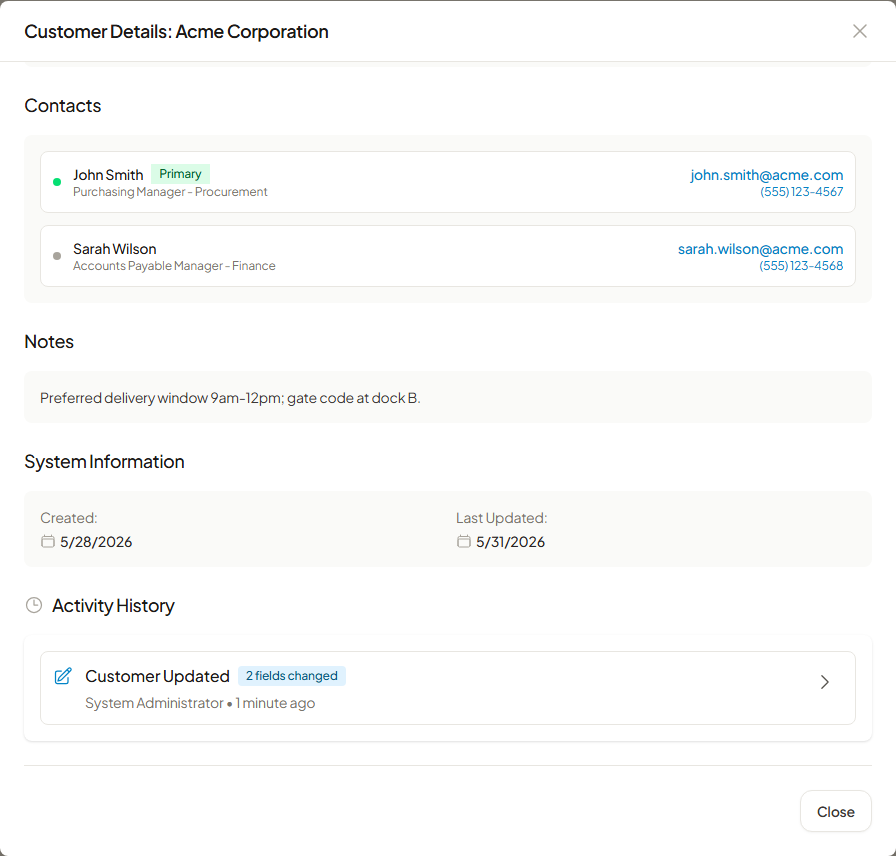
Activity History lists entries newest-first as a timeline. Each one shows:
| Element | Description |
|---|---|
| When | A relative timestamp (e.g., "2 hours ago"), with the exact time on hover/expand. |
| Action | What kind of change occurred — see event types below — with an icon. |
| Who | The user who performed the action (name and email). |
| What changed | For field-level edits, the field name with its old value → new value. |
| Reason | The justification, when one was supplied (for example, a pick list cancellation reason). |
| Details | Additional context captured with the change, available when you expand an entry. |
Expand any entry to see the full field-by-field changes and details; the list scrolls to load older entries as you go.
Event types
Activity History records these kinds of events:
| Event | Meaning |
|---|---|
| Create | A new record was created. |
| Update | One or more fields were edited. |
| Status change | The record's status changed (e.g., an order moving from Allocated to Picking). |
| Delete / Soft delete / Reactivate | A record was removed, archived, or restored. |
| Cancel | The record was cancelled. |
| Reallocate / Allocation created | Inventory allocation changes on an order. |
| Pick list created / assigned / started / completed / cancelled | Lifecycle events on a pick list. |
| Permission added / removed / updated, read-only changed | Role and permission changes. |
The exact set of events that appears depends on the record type — a role shows permission events, while an order shows allocation and pick-list events.
Browsing a long history
The Activity History timeline always shows the most recent activity first. To work through a longer history, scroll the panel — it loads older entries as you reach them — and expand any entry to see its full field-by-field detail.
Field-level filtering on inventory
The standalone Inventory Audit History view (see above) is the one place with a built-in filter: use Filter by Field to show only changes to a single field, such as quantity or location.
Retention
The platform does not automatically delete or expire Activity History — entries are retained for the life of the record so the audit trail stays complete. There is no built-in purge or archival schedule.
Related guides
Order and Pick List Activity History was introduced in v1.6.0, viewable from order and shipment details.