Reports
Table of Contents
- Overview
- Getting Started
- Reports Interface
- Report Categories
- Report Templates
- Inventory Reports
- Order Reports
- Receiving Reports
- Shipping Reports
- Financial Reports
- Operational Reports
- Creating Reports
- Report Parameters
- Scheduling Reports
- Exporting Reports
- Report History
- Custom Reports
- Best Practices
- Troubleshooting
Overview
The Reporting system provides comprehensive business intelligence and operational analytics for the Zora Tech Logistics Platform. Generate, schedule, and export reports covering inventory, orders, receiving, shipping, and financial operations.
Key Capabilities:
- Pre-built report templates for common analytics needs
- Custom report builder for specialized analysis
- Scheduled automated report generation
- Multiple export formats (PDF, Excel, CSV)
- Historical report execution tracking
- Warehouse-scoped reporting with multi-warehouse views
- Real-time data with automated refresh
- Email delivery of scheduled reports
Getting Started
Prerequisites
Before using reports:
- Permissions: Reporting permissions from assigned role
- Warehouse Access: Access to warehouses you want to report on
- Data Understanding: Familiarity with logistics metrics and KPIs
- Date Ranges: Understanding of relevant time periods for analysis
When to Use Reports
Reports are essential for:
- Daily Operations: Morning/evening operational summaries
- Inventory Management: Stock level analysis and reorder planning
- Performance Tracking: Order fulfillment rates and cycle times
- Financial Analysis: Billing, costs, and revenue reporting
- Compliance: Audit trails and regulatory documentation
- Strategic Planning: Trend analysis and capacity planning
- Client Reporting: Customer-specific activity and metrics
Reports Interface
Access reports through the Administration section:
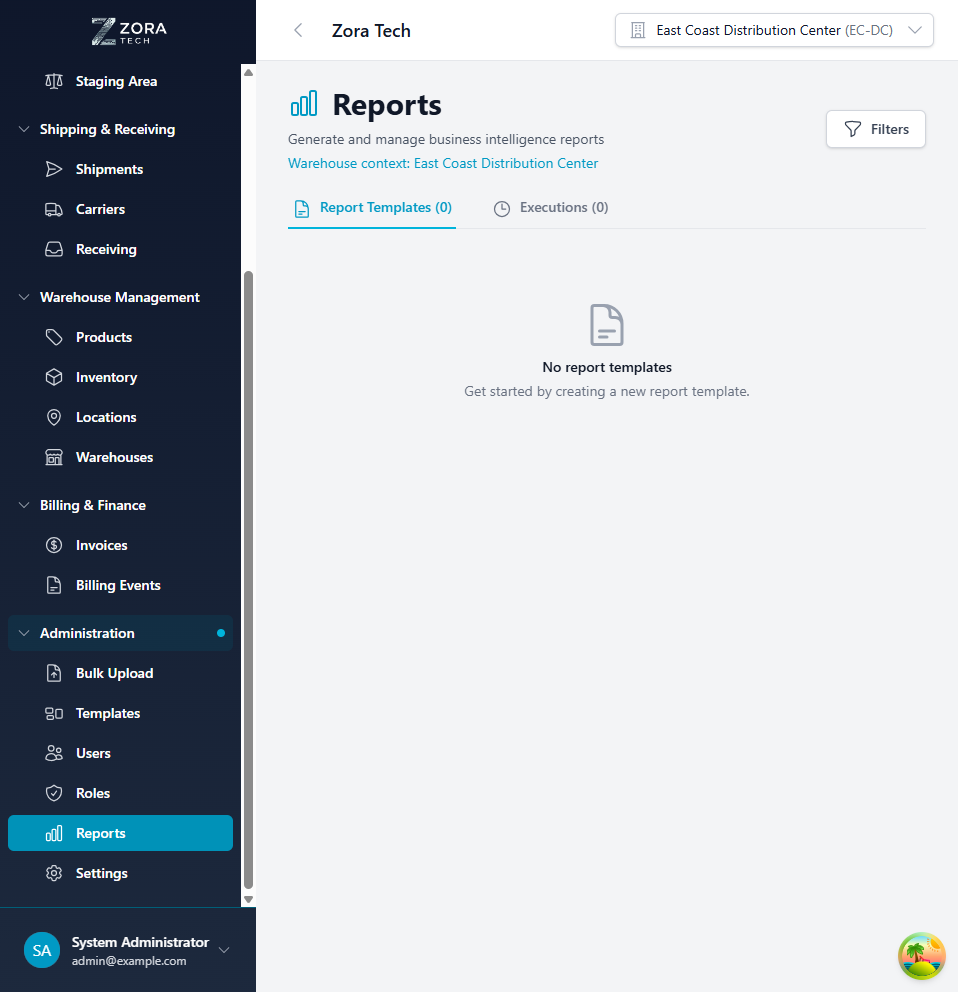
Interface Components:
- Report Templates Tab: Browse pre-built report templates
- Report Executions Tab: View report run history
- Search Bar: Find reports by name or category
- Filters: Filter by category, warehouse, date range
- Run Report Button: Execute selected report
- Schedule Button: Set up automated report generation
- Export Options: Download in various formats
Report Templates View:
- Template Cards: Each showing report name, description, category
- Parameters: Required/optional report parameters shown
- Run Button: Execute report immediately
- Schedule Icon: Access scheduling options
- Favorite Star: Mark frequently used reports
Report Executions View:
- Execution History: List of all generated reports
- Status: Completed, Running, Failed
- Parameters Used: Date ranges and filters applied
- Download Link: Access completed report files
- Re-run Button: Execute report again with same parameters
Report Categories
Reports organized by functional area:
Inventory Reports
Focus on stock levels, movements, and accuracy
Order Reports
Customer orders, fulfillment, and performance
Receiving Reports
Inbound shipments, receiving accuracy, putaway
Shipping Reports
Outbound shipments, carrier performance, tracking
Financial Reports
Billing, costs, revenue, and financial metrics
Operational Reports
Productivity, efficiency, and operational KPIs
Warehouse Reports
Location utilization, capacity, and warehouse metrics
Custom Reports
User-defined reports and saved queries
Report Templates
Inventory Reports
Inventory Levels Report - Current quantity on hand for all products - Available vs allocated quantities - Location breakdown - Low stock alerts (below reorder point) - Parameters: Warehouse, product category, date
Inventory Movement Report - All inventory transactions (receipts, picks, adjustments) - Transaction type and quantity changes - User and timestamp for each movement - Beginning/ending balances - Parameters: Date range, warehouse, transaction type
Cycle Count Accuracy Report - Cycle count results and variance analysis - Accuracy percentage by location/product - High-variance items flagged - Adjuster identification - Parameters: Date range, warehouse, variance threshold
Inventory Aging Report - Days in inventory for all stock - Aging categories (0-30, 31-60, 61-90, 90+ days) - Potential obsolescence identification - Turnover calculations - Parameters: Warehouse, aging threshold, product category
Stock Valuation Report - Inventory value at cost - Breakdown by product, category, location - Total warehouse valuation - Period-over-period changes - Parameters: As-of date, warehouse, valuation method
Order Reports
Order Fulfillment Report - Orders processed in period - Fulfillment time metrics (order to ship) - On-time delivery performance - Order status breakdown - Parameters: Date range, warehouse, customer, status
Pick Performance Report - Picking productivity by user - Lines picked per hour - Pick accuracy rates - Error analysis - Parameters: Date range, warehouse, user, shift
Order Accuracy Report - Shipping errors and corrections - Accuracy by product/picker - Root cause analysis - Return rate correlation - Parameters: Date range, warehouse, error type
Backorder Report - Items on backorder status - Backorder age and priority - Expected availability date - Customer impact analysis - Parameters: Warehouse, product, customer, age threshold
Order Status Summary - Current orders by status (new, allocated, picked, shipped) - Status change timeline - Bottleneck identification - Projected completion times - Parameters: Warehouse, date range, status
Receiving Reports
Inbound Receiving Report - Detailed receiving order data with line-item breakdown - Location and LPN columns for putaway tracking - Equipment number filter for freight-specific lookups - Multi-page PDF support for large datasets - Parameters: Date range, warehouse, customer, equipment number
Receiving Performance Report - Receipts processed in period - Time from arrival to putaway - Receiving accuracy vs ASN/PO - Dock-to-stock time metrics - Parameters: Date range, warehouse, supplier
Supplier Performance Report - On-time delivery rates by supplier - Quantity accuracy (ordered vs received) - Quality issues and rejections - Lead time analysis - Parameters: Date range, warehouse, supplier
Putaway Efficiency Report - Putaway time metrics - Location assignment accuracy - Labor productivity - Aging in staging areas - Parameters: Date range, warehouse, user
Receiving Discrepancy Report - Variances between PO and received quantity - Overages and shortages - Damaged goods reports - Resolution status and time - Parameters: Date range, warehouse, variance type
Shipping Reports
Shipment Summary Report - Shipments processed in period - Carrier breakdown - Service level distribution - Shipping costs - Parameters: Date range, warehouse, carrier
Carrier Performance Report - On-time delivery by carrier - Shipping time vs promised delivery - Cost per shipment by carrier - Damage/loss rates - Parameters: Date range, warehouse, carrier
Freight Cost Analysis - Total shipping costs in period - Cost per order/unit - Carrier cost comparison - Discount utilization - Parameters: Date range, warehouse, carrier, service level
Tracking Status Report - Current shipment tracking status - Delayed shipments identification - Exception management - Delivery confirmation status - Parameters: Shipment date range, warehouse, carrier
Financial Reports
Billing Summary Report - Total billing for period - Breakdown by customer/service type - Revenue trends - Payment status - Parameters: Date range, warehouse, customer
Storage Billing Report - Storage fees by customer - Pallet/bin utilization and charges - Long-term storage identification - Billing rate analysis - Parameters: Billing period, warehouse, customer
Sales Report - Revenue by customer with invoice-level detail - Sales representative subtotals and performance - Currency-formatted amounts - Filterable by date range, warehouse, customer, and sales rep - Parameters: Date range, warehouse, customer, sales rep
Labor Cost Report - Labor hours by operation type - Cost allocation across activities - Productivity vs labor cost - Overtime analysis - Parameters: Date range, warehouse, cost center
Cost Per Unit Report - Fulfillment cost per order/line - Storage cost per pallet/unit - Total cost to serve by customer - Margin analysis - Parameters: Date range, warehouse, customer
Operational Reports
Warehouse Capacity Report - Current space utilization - Available capacity by zone - Projected capacity needs - Historical trends - Parameters: As-of date, warehouse, zone
Productivity Dashboard - KPIs across all operations - Orders shipped vs target - Picking lines per hour - Receiving throughput - Accuracy metrics - Parameters: Date range, warehouse, shift
SLA Compliance Report - Service level agreement performance - On-time fulfillment rates - Accuracy commitments - SLA breach analysis - Parameters: Date range, warehouse, customer, SLA type
Exception Report - All operational exceptions - Error types and frequencies - Resolution time metrics - Trend analysis - Parameters: Date range, warehouse, exception type, severity
Creating Reports
Running Standard Reports
Execute pre-built report templates:
Step-by-Step:
- Select Report Template
- Navigate to Reports interface
- Browse or search for desired report
-
Click report template card
-
Configure Parameters
- Date Range: Select start and end dates
- Warehouse: Choose specific warehouse or "All Warehouses"
- Filters: Apply optional filters (customer, product, user, etc.)
-
Grouping: Select how to group results (daily, weekly, by category)
-
Preview Settings
- Review parameter summary
- Check estimated report size
-
Verify warehouse scope
-
Execute Report
- Click Run Report button
- Report processing begins
- Progress indicator shows status
-
Notification when complete
-
View Results
- Report opens in viewer
- Interactive tables with sorting/filtering
- Charts and visualizations
- Summary statistics
Report Parameters
Common parameters across reports:
Date Parameters: - Date Range: Start and end dates for data inclusion - As-Of Date: Point-in-time snapshot for inventory/capacity reports - Comparison Periods: Prior period for trend analysis - Relative Dates: Last 7 days, last month, quarter, year
Scope Parameters: - Warehouse: Single warehouse or multi-warehouse view (reports use the warehouse's configured timezone for date filtering) - Customer: Specific customer or all customers - Product/Category: Product filter or category grouping - User: Individual user or team performance - Sales Rep: Filter by assigned sales representative (for sales and CRM reports)
Filter Parameters: - Status: Order status, inventory status, etc. - Transaction Type: Receipt, pick, adjustment, etc. - Threshold Values: Variance thresholds, aging days, stock levels - Exception Types: Error categories, severity levels
Output Parameters: - Grouping: How to aggregate data (daily, weekly, by customer) - Sort Order: Primary and secondary sort fields - Detail Level: Summary vs detailed line-item data - Include Charts: Visual representations in output
Scheduling Reports
Automate report generation and delivery:
Creating Schedules
Setup Process:
- Select Report Template
- Choose report to schedule
-
Click Schedule button
-
Configure Schedule
- Frequency: Daily, weekly, monthly, quarterly
- Day/Time: Specific day of week/month and time
-
Time Zone: Report generation time zone
-
Set Parameters
- Default parameters for each run
- Relative date ranges (e.g., "last 7 days" updates daily)
-
Static filters that remain constant
-
Delivery Options
- Email: Send to specified email addresses
- Save to System: Store in report history
-
External Integration: POST to webhook/API
-
Recipients
- Add email addresses
- Include internal users or external contacts
- CC/BCC options
-
Email subject and message customization
-
Activate Schedule
- Review schedule summary
- Enable/disable schedule
- Save configuration
Managing Schedules
View Active Schedules: - List all scheduled reports - Next execution time displayed - Edit or delete schedules - Pause/resume schedules - Execution history for each schedule
Schedule Execution: - Runs automatically at specified time - Uses parameters defined in schedule - Generates report - Delivers via configured method - Logs execution result
Failure Handling: - Email notification if execution fails - Retry logic for transient failures - Error details in execution log - Manual re-run option
Exporting Reports
Download reports in multiple formats:
Export Formats
PDF - Formatted, print-ready documents - Includes charts and visualizations - Page breaks and headers/footers - Best for: Presentations, client reporting, archival
Excel (XLSX) - Multi-sheet workbooks - Formatted tables with formulas - Pivot-table ready data - Best for: Further analysis, data manipulation, charting
CSV - Raw data export - No formatting, pure comma-separated values - Import-friendly - Best for: Data integration, database import, scripting
JSON - Structured data export - API integration format - Programmatic consumption - Best for: System integrations, automated processing
Export Process
- Generate or open existing report
- Click Export button
- Select desired format
- Configure export options (page size, delimiters, etc.)
- Click Download
- File downloads to browser default location
Export Options
PDF Options: - Page Size: Letter, Legal, A4 - Orientation: Portrait or Landscape - Include: Cover page, charts, page numbers - Compression: Standard or high quality
Excel Options: - Single Sheet or Multi-Sheet - Include Formulas: Yes or No - Freeze Header Row - Auto-Column Widths
CSV Options: - Delimiter: Comma, Tab, Pipe - Quote Character: Double quote, single quote - Line Ending: Windows (CRLF) or Unix (LF) - Include Headers: Yes or No
Report History
Execution History
Track all generated reports:
History View: - Chronological list of report executions - Report name and template - Execution date/time and duration - User who executed report - Parameters used - File size - Download link (30-day retention)
Filtering History: - Filter by report template - Filter by date range - Filter by user - Filter by status (completed, failed)
Re-Running Reports
Execute historical report again:
- Locate report in execution history
- Click Re-Run button
- Pre-filled with historical parameters
- Adjust parameters if needed
- Execute report
- New execution created in history
Retention Policy
Report File Retention: - Completed reports: 30 days - Scheduled reports: 90 days - Archived reports: 1 year (available on request) - Metadata (execution history): Indefinite
Custom Reports
Report Builder
Create custom reports for specialized analysis:
Builder Features: - Drag-and-drop field selection - Custom calculations and formulas - Filter and grouping configuration - Visualization builder (charts, gauges) - Saved query templates
Building Process:
- Select Data Source
- Choose primary entity (orders, products, inventory)
-
Add related entities (joins)
-
Select Fields
- Add columns to include in report
- Order columns for display
-
Apply formatting (date format, number precision)
-
Add Filters
- Define filter criteria
- Use parameters for runtime values
-
Combine filters with AND/OR logic
-
Configure Grouping
- Group by dimensions (date, customer, product)
- Add aggregate functions (sum, count, average)
-
Nested grouping for multi-level analysis
-
Add Visualizations
- Create charts from data
- Configure chart type (bar, line, pie)
-
Set chart titles and labels
-
Save Template
- Name custom report
- Save as template for reuse
- Share with other users (if permitted)
Query Language
Advanced users can write SQL-based queries:
- Direct database query access (read-only)
- Full SQL SELECT capabilities
- Parameterization support
- Query validation before execution
- Performance optimization hints
Security: - Read-only access enforced - Warehouse filtering automatically applied - Sensitive fields restricted by role - Query timeout limits
Best Practices
Report Design
- Clear Purpose: Define what question the report answers
- Relevant Metrics: Include only necessary data points
- Appropriate Timeframe: Match date range to analysis needs
- Consistent Format: Use standard formatting for similar reports
- Actionable Insights: Highlight key findings and exceptions
Performance Optimization
- Limit Date Ranges: Shorter periods generate faster
- Filter Early: Apply filters to reduce data volume
- Schedule Large Reports: Run overnight for big datasets
- Use Summaries: Aggregate data rather than line-item detail
- Archive Old Data: Historical data in separate warehouse for analysis
Data Quality
- Validate Parameters: Ensure date ranges and filters are logical
- Cross-Check Results: Verify totals against known values
- Document Assumptions: Note calculation methods and exclusions
- Regular Review: Audit report accuracy periodically
- Feedback Loop: Gather user input on report usefulness
Scheduling Strategy
- Off-Peak Hours: Schedule for nights/early morning
- Stagger Schedules: Avoid multiple large reports at same time
- Conditional Execution: Only run if data available
- Appropriate Frequency: Match schedule to data freshness needs
- Review Recipients: Regularly update distribution lists
Troubleshooting
Report Times Out
Symptom: Report execution exceeds time limit and fails
Solutions: 1. Reduce date range (e.g., one month instead of year) 2. Add filters to limit data volume 3. Use summary/aggregate version instead of detail 4. Schedule report to run overnight 5. Contact support for database optimization
Export File Too Large
Symptom: Cannot export due to file size limits
Solutions: 1. Export in CSV format (smaller than Excel) 2. Split into multiple reports by date range 3. Use filtering to reduce data 4. Export summary instead of detail 5. Contact support for direct database export
Incorrect Data in Report
Symptom: Report results don't match expectations
Solutions: 1. Verify date range parameters 2. Check warehouse filter selection 3. Review any applied filters 4. Cross-check with transaction logs 5. Verify data entered correctly in system 6. Check for timezone issues in date filtering
Report Not Emailing
Symptom: Scheduled report doesn't arrive via email
Solutions: 1. Check spam/junk folder 2. Verify email addresses in schedule configuration 3. Check execution history for failure details 4. Verify email service is operational 5. Test with different email address 6. Review email server logs (admin)
Can't Find Report Template
Symptom: Expected report not visible in template list
Solutions: 1. Check permissions include report access 2. Verify warehouse filter includes relevant warehouse 3. Use search function for report name 4. Check category filters 5. Confirm report exists for your platform version
Related Documentation
- Settings - Configure report defaults and preferences
- Users - User permissions for report access
- Roles - Role-based report permissions
Support
For reporting assistance:
- Email: support@zoratech.io
- FAQ: Reporting FAQ
- Troubleshooting: Common Issues