Dashboard Metrics
Understanding your real-time operational metrics and KPIs.
Overview
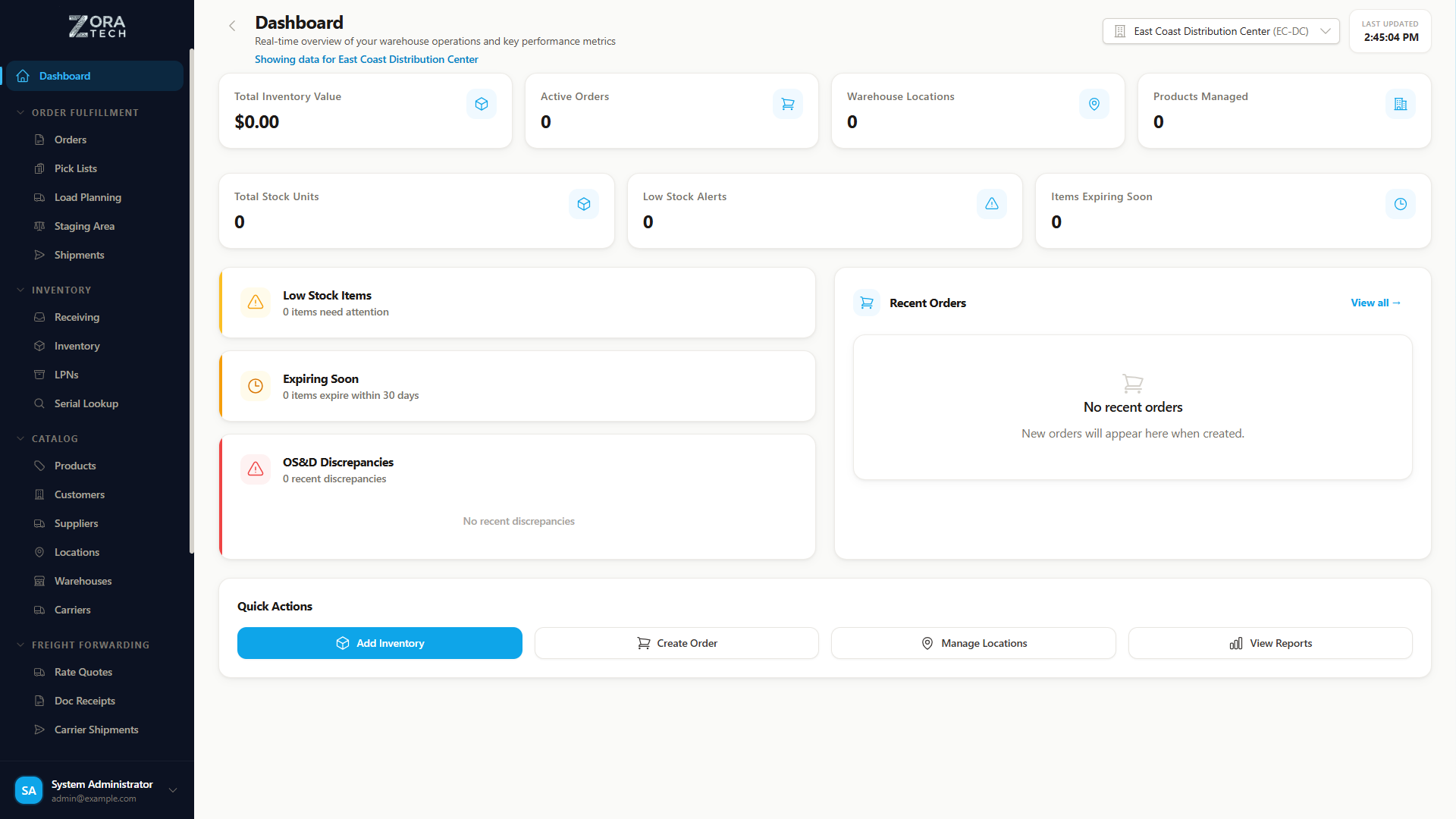
The Zora Tech dashboard displays key performance indicators (KPIs) for your warehouse operations. This guide explains what each metric means and how to use them.
Live Data
Dashboard metrics update in real-time as operations occur. Refresh your browser to see the latest data.
Primary Metrics
Inventory Value
What it shows: Total value of all inventory across your warehouses
Calculation: Sum of (Quantity × Unit Cost) for all products
Use cases: - Track inventory investment - Monitor stock value trends - Financial reporting - Insurance purposes
Typical ranges: - Small warehouse: $50K - $500K - Medium warehouse: $500K - $5M - Large warehouse: $5M+
Accuracy
Inventory value depends on accurate product costs and quantities. Regular cycle counting ensures accuracy.
Active Orders
What it shows: Number of orders currently being processed
Included statuses: - Pending (awaiting allocation) - Allocated (reserved inventory) - Picked (items collected) - Packed (ready to ship)
Excluded statuses: - Shipped (completed) - Cancelled (not processed)
Use cases: - Monitor daily workload - Identify bottlenecks - Plan staff requirements - Track fulfillment capacity
Typical ranges: - Low volume: 10-50 orders/day - Medium volume: 50-200 orders/day - High volume: 200+ orders/day
Total Products
What it shows: Number of unique SKUs in your catalog
Calculation: Count of distinct product records
Use cases: - Track catalog growth - Understand inventory complexity - Plan warehouse space - Assess staffing needs
Typical ranges: - Small catalog: 100-1,000 SKUs - Medium catalog: 1,000-10,000 SKUs - Large catalog: 10,000+ SKUs
Warehouses
What it shows: Number of active warehouse facilities
Included: Only enabled warehouses
Use cases: - Multi-location operations - Geographic distribution - Facility management
Secondary Metrics
Low Stock Items
What it shows: Products below reorder point
Use cases: - Prevent stockouts - Trigger reordering - Inventory planning
Action: Review and create purchase orders
Pending Receipts
What it shows: Incoming shipments awaiting receiving
Use cases: - Plan receiving staff - Prepare dock space - Monitor supplier delivery
Action: Process receiving queue
Pick Rate
What it shows: Average picks per hour per worker
Calculation: Total picks ÷ Total hours worked
Industry benchmarks: - Basic warehouse: 40-60 picks/hour - Optimized warehouse: 60-100 picks/hour - Automated warehouse: 100+ picks/hour
Use cases: - Measure productivity - Identify training needs - Compare shift performance - Set performance goals
Order Fill Rate
What it shows: Percentage of orders shipped complete
Calculation: (Complete orders ÷ Total orders) × 100
Target: 95% or higher
Use cases: - Measure fulfillment quality - Identify inventory gaps - Track customer satisfaction
Metric Trends
Understanding Trend Indicators
Dashboard metrics may show trend indicators:
↑ Green Arrow = Increased from previous period ↓ Red Arrow = Decreased from previous period Percentage = Change magnitude
Interpreting Trends
Inventory Value Increasing: - ✅ Good: Business growth, seasonal stock-up - ⚠️ Caution: Overstocking, slow-moving inventory
Active Orders Increasing: - ✅ Good: Business growth, high demand - ⚠️ Caution: Processing bottleneck, staff shortage
Pick Rate Decreasing: - ⚠️ Caution: Training needed, layout issues - ✅ Good: (If order complexity increased)
Using Metrics for Decision Making
Daily Operations
Morning Review: - Check active orders for today's workload - Review pending receipts for incoming shipments - Check low stock items for urgent reorders
End of Day: - Verify all orders processed - Review pick rate performance - Check pending items for tomorrow
Weekly Analysis
Compare week-over-week: - Order volume trends - Inventory value changes - Pick rate performance - Fill rate percentage
Actions: - Adjust staffing based on order trends - Reorder low stock items - Investigate pick rate drops - Address fill rate issues
Monthly Reporting
Executive Summary: - Total inventory investment - Average daily order volume - Overall fill rate percentage - Pick productivity trends
Strategic Planning: - Catalog growth analysis - Warehouse utilization - Staffing requirements - Process improvement opportunities
Custom Date Ranges
Some metric views allow custom date ranges:
Common Ranges: - Today - This Week - This Month - Last 30 Days - Last Quarter - Custom Range
Use cases: - Compare seasonal performance - Analyze specific time periods - Generate reports for stakeholders
Exporting Metric Data
Export Options
- Screenshot - Capture dashboard view
- PDF Report - Generate formatted report
- CSV Export - Raw data for analysis
- Email Report - Schedule automatic delivery
Report Frequency
- Daily snapshot
- Weekly summary
- Monthly executive report
- Custom schedule
Metric Accuracy
Data Quality
Metrics are only as accurate as the data:
Ensure Accuracy: - ✅ Complete all receiving promptly - ✅ Record all shipments immediately - ✅ Perform regular cycle counts - ✅ Update product costs regularly - ✅ Process adjustments same day
Common Issues: - ❌ Delayed receiving = understated inventory - ❌ Missing shipments = overstated orders - ❌ Old costs = inaccurate value - ❌ Skipped counts = drift over time
Advanced Metrics
Coming Soon
Additional advanced metrics being developed:
- Inventory Turnover Rate
- Order Cycle Time
- Putaway Efficiency
- Warehouse Utilization
- Cost per Order
- Return Rate
Related Guides
Need Help?
Questions about specific metrics?
Last Updated: January 2025