Serial Number Lookup
Search for any serial number to see its current status and location, and review its full movement history from receiving to shipping.
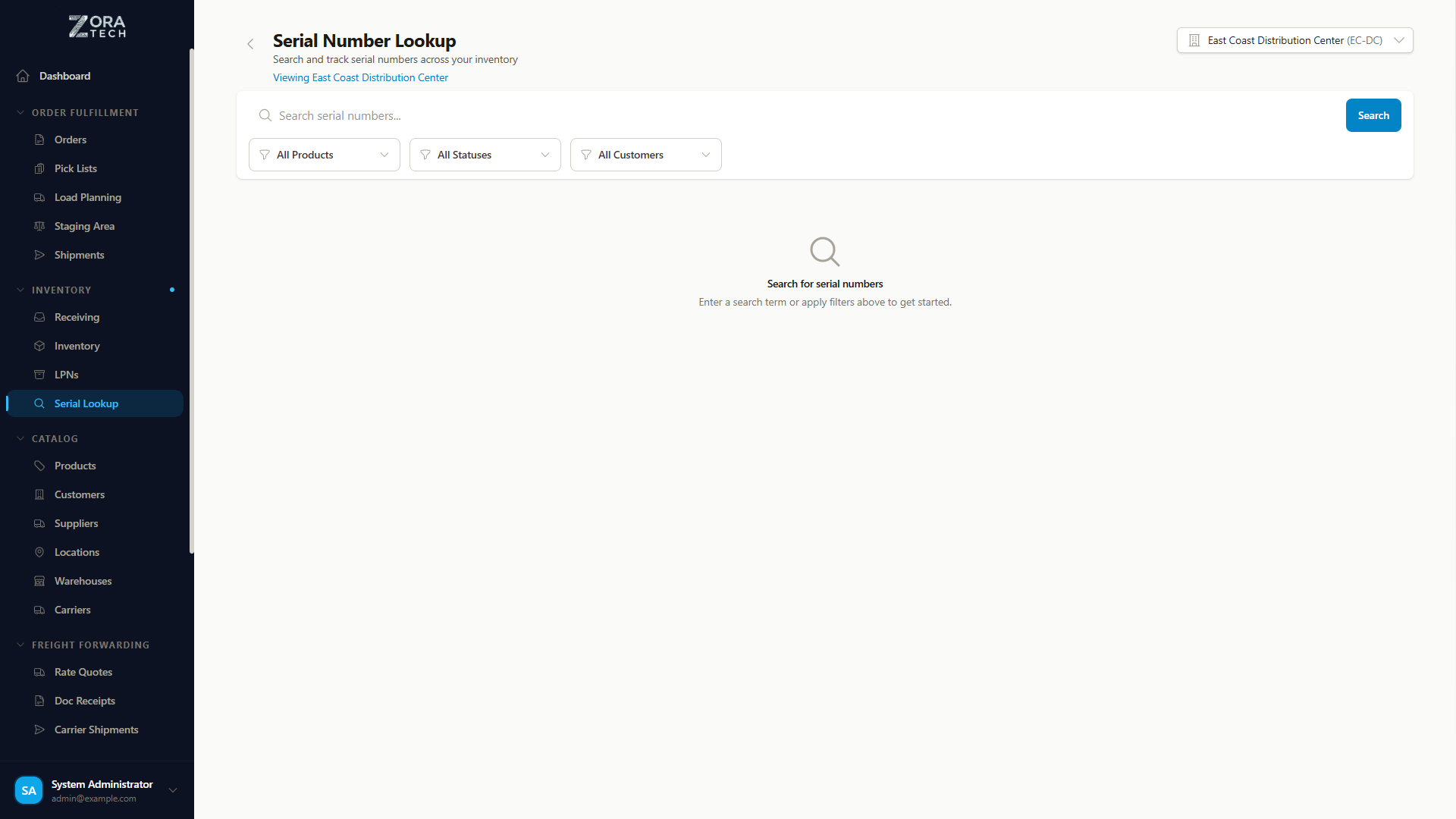
Serial Number Lookup pulls together receiving, inventory, orders, and shipments into one read-only, searchable view, so you don't have to check each of those separately to find one item.
Opening serial number lookup
Go to Products → Serial Number Lookup.
Finding a serial number
| Tool | What it does |
|---|---|
| Search | Finds serial numbers by partial or exact match, updating as you type |
| Product filter | Narrows results to one product |
| Status filter | Narrows to one or more lifecycle statuses |
Click any result to open its detail view.
Searching by fragment
A partial search matches anywhere in the number. Search 456 to find every serial number containing 456, or search the last few digits when that's all you have.
Combine search with the filters for a precise result — search SN-2024, filter Product to Laptop Model X, and filter Status to IN_INVENTORY, to find that model's in-stock units starting with SN-2024.
Serial number lifecycle
graph LR
    A[EXPECTED] --> B[RECEIVED]
    B --> C[IN_INVENTORY]
    C --> D[ALLOCATED]
    D --> E[PICKED]
    E --> F[SHIPPED]

    C -.Not found in count.-> G[MISSING]
    C -.Written off.-> H[LOST]

    D -.Cancel Order.-> C
E -.Return.-> C| Status | What it means |
|---|---|
EXPECTED | Created when the receiving order is planned. Common for an Advance Shipment Notice (ASN). Not yet physically received. |
RECEIVED | Physically received at the warehouse. May still be in the receiving staging area, not yet put away. |
IN_INVENTORY | Stored in an inventory location and available for allocation — the normal resting state. |
ALLOCATED | Reserved for a specific customer order and not available for others, waiting to be picked. |
PICKED | Picked from its location and staged for packing — fulfillment in progress. |
SHIPPED | Dispatched with a shipment and out of warehouse custody. |
MISSING | A cycle count expected this serial number at its location and couldn't find it. |
LOST | Written off — no longer expected to turn up. |
When a serial number goes missing
A cycle count that can't find a serial number it expected marks it MISSING. Both MISSING and LOST are end states — the platform stops treating that item as available stock. If it turns up later, receiving it again brings it back into inventory.
Viewing a serial number's details
Click any serial number in the search results to open its detail view.
| Section | Shows |
|---|---|
| Serial number information | The serial number, current status badge, product name, SKU, description, and a link to the product page |
| Current location | Warehouse, inventory location (if IN_INVENTORY), LPN, and staging area, whichever apply |
| Order information | The receiving order (if EXPECTED or RECEIVED), the customer order (if ALLOCATED or PICKED), or the shipment (if SHIPPED), each linked |
| Quantity information | Always 1 for a serial-tracked item, with a color-coded status indicator |
| Movement history | Every status change with its timestamp, LPN transfers and relocations, and who performed each action |
| Date information | Date received, allocated, picked, and shipped, where each applies, plus when the record was last updated |
Mobile access
Serial Number Lookup works on a phone or warehouse terminal: a touch-friendly, card-based results list, and a camera icon in the search bar for barcode scanning.
To look up an item on the floor:
- Open the mobile app and go to Serial Number Lookup.
- Tap the camera icon and scan the serial number's barcode.
- Read the current location and status.
- Go to that location to pick or count the item.
Common tasks
| You need to | Do this |
|---|---|
| Look up a specific item for a customer | Search the serial number, then read its status and location. |
| Confirm what's currently in inventory | Filter Status to IN_INVENTORY, and filter by Product if you're checking a specific model. |
| Trace an item's full journey through the warehouse | Open its detail view and read Movement history. |
| Resolve a dispute over whether an item shipped | Confirm the status is SHIPPED, check the shipment's tracking details, and pull the movement history as your record. |
| Find available units of a product | Filter by Product and set Status to IN_INVENTORY. |
Working with other features
| From here, you can | Reach it by |
|---|---|
| Open the product record | The link on the serial number's detail view |
| See every serial number for a product | The Product filter |
| See everything else stored at a location | Clicking the location on the detail view |
| See which order a serial number is committed to | The order link on an ALLOCATED or PICKED serial number |
| See which receiving order a serial number is expected on | The order link on an EXPECTED serial number |
| Open a shipment's tracking and Bill of Lading (BOL) | The shipment link on a SHIPPED serial number |
Reporting
| Report | Shows |
|---|---|
| Serial Number Status | Count of serial numbers by status, to spot bottlenecks in the workflow |
| Serial Number Movement | Average time spent in each status, to spot slow-moving items |
| Product Serial Number | Every serial number for a product, in-stock versus shipped, for warranty tracking |
Export any search result to CSV, including status and location, for reporting outside the platform.
Getting it right
- Check status and location before you act on them, and use Movement history to confirm anything recent.
- If a location doesn't match the physical item, report it to your supervisor and correct it with a cycle count.
- Before picking, confirm a serial number is
ALLOCATED. After picking, confirm it moved toPICKED. - After receiving, confirm serial numbers reach
IN_INVENTORY. One stuck inRECEIVEDstill needs putaway.
Troubleshooting
| Problem | What to check |
|---|---|
| Serial number not found | Confirm the spelling. Check whether a receiving order exists for it but hasn't been received yet. Try a partial search, such as the last 4 digits. Contact your administrator if it should exist. |
| Status looks wrong | Refresh the page. Check Movement history for a recent change. Check the related order or shipment. Report it to your supervisor if it's still wrong. |
| Location isn't showing | For IN_INVENTORY, a location should always show — if it's missing, the item may still need putaway. For other statuses, check the receiving order for its staging location; the item may not be put away yet. |
| Movement history is missing or incomplete | Recently created serial numbers have full history. Older ones may only have partial history, from before movement tracking was enabled or from a data migration. |
Related guides
- Serial & Lot Tracking Overview - Serial and lot tracking together, and how to turn them on
- Receiving Operations - Serial and lot entry during receiving
- Inventory Management
- Order Processing - Serial and lot picking
- Shipping Operations
Need more help?
Check the FAQ or the troubleshooting guide, or email support@zoratech.io.